
Our PBX
Meet our Cloud PBX — a convenient tool for managing calls, users, routing, and activity. The system is still growing, but the key features are already available to support your business communication.
Dashboard
View your call activity, key statistics, and performance dynamics in one place. The dashboard helps you understand changes, track results, and quickly see how your communication is performing.
Advanced Statistics
Analyze your communication in more detail. Review time spent on the line by agents, track call success rates by country, and understand which routes or teams perform best.
Recordings
All calls can be recorded and stored for later review. Listen to or download recordings when you need to assess quality, check details, train agents, or resolve customer questions.
CDRs
Access the full list of calls with detailed history for each interaction. Check when the call happened, who was involved, call status, duration, destination, and other important details.
Listen & Whisper
Monitor live calls and support your agents in real time. With Listen and Whisper features, you can hear the conversation and quietly guide your agent without the customer hearing you.
Click to Call
Call customers directly from your CRM without copying and pasting phone numbers. Click to Call helps your team save time, reduce manual steps, and start calls faster.

Core PBX Features
Dashboard · CDRs · Quick Statistics · Reports · Agent Statistics · Live Calls · Recordings · Agents' List

Explore your call activity in one place. The dashboard helps you track performance, monitor changes, and quickly understand how your communication is going.

Not enough?..
Advanced Functions
Click2Call · Routes · IVR · Integrations · White List · Black List · Macros · Journals, etc.

Activity
The Activity section shows the technical history behind your PBX. You can review call events, system actions, user activity, and detailed records to understand what happened, when it happened, and how your phone system is being used.
Profile
The Profile section is the control center for your PBX settings. You can manage account details, language, time zone, date and sound formats, storage limits, daily statements, and other system preferences that keep your phone environment organized.


C2C
Click2Call helps your team call faster with fewer manual steps. You can create secure calling links, connect them to your CRM or workflow, and start calls directly from your system without copying and pasting phone numbers.
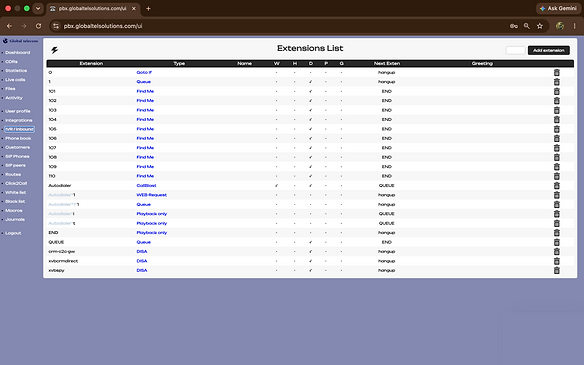
Exctension List
IVR / Inbound gives you control over how incoming calls move through your PBX. You can create extensions, queues, greetings, menus, and routing rules to make sure callers are guided clearly and connected to the right place.
